Please note: This site is not available to the public and can only be accessed via WhiteWater’s network by the employees.
Steps to order merchandise from the WhiteWater Swag Store:
- Create an account using your corporate email, by clicking on the Register button.
- Login to the store using your account information
- Select the items that you need and add them in the cart, make sure to put the quantity as well
- For apparel and some selected items, you need to select more options such as size, colour and quantity before adding them into the cart
- Visit your cart when the order is finalized
- Now, click on the ‘Proceed to Checkout’ button
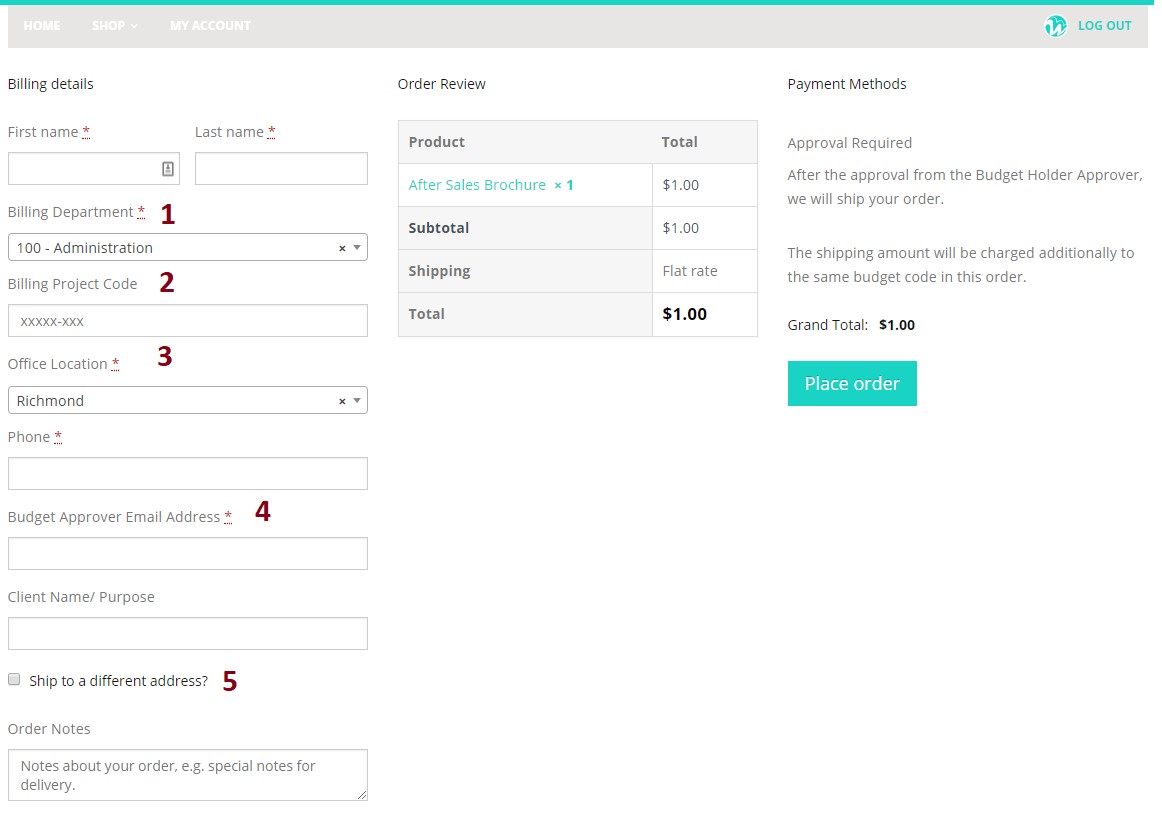
- Next, fill all the required information at the checkout page
- Click on the ‘Place Order’ button
- Once you have placed the order, you will get a copy of your order via email
- Next, we will send an email to your budget approver for the order approval
- The order will be shipped and delivered, once we get the approval
Note: Prices for the brochures and printed material is just for showing value and will not be charged to your department
Instructions for the Check Out Page:
- Please ensure that you select the right billing department relevant to the order
- If the merchandise is requested for a project, please remember to mention the project code in the right format
- Select your office location
- Next, please provide the budget approver’s email address
- Remember to select the ‘Ship to a different address?’ option and fill the complete address, if the merchandise needs to be shipped to a different location than you work, (i.e. client location, project location, trade shows)